1、how to pass data from child to parent
关键词拆解:
Child → Parent
- 数据流从子组件传到父组件
- 这是 React 单向数据流(unidirectional data flow) 的逆向传递
Data
- 可以是事件信息、表单值、状态更新结果等
核心考点:
- 如何在 React 中实现 子向父传递数据
- 是否了解 回调函数 / props / lifting state up
- 能够写出简洁可用的示例
拆解小问题:
父组件如何接收数据?
- 父组件定义一个函数,用来处理子组件传来的数据
子组件如何传数据?
- 将父组件的函数通过 props 传给子组件
- 子组件调用这个函数,把数据作为参数传回父组件
In React, the standard way to pass data from a child to a parent is by using callback functions. The parent component defines a function to handle the data, then passes it to the child via props. The child calls this function whenever it wants to send data back. For example:
x1// Parent2function Parent() {3const handleData = (value) => console.log('Received:', value);4return <Child onSendData={handleData} />;5}67// Child8function Child({ onSendData }) {9return <button onClick={() => onSendData('hello parent')}>Send Data</button>;10}This pattern, often called lifting state up, keeps React’s unidirectional data flow predictable, while letting children communicate with parents. It’s simple, reusable, and works for most scenarios without adding extra state management libraries.
面试加分点
- 提到 lifting state up
- 强调 unidirectional data flow
- 简单示例展示 callback + props 的用法
2、how to render an element outside of component scope/tree?
关键词拆解:
Render outside component tree
- 意思是把某个 React 元素渲染到 DOM 中不在父组件层次结构的地方
- 常见场景:模态框(Modal)、工具提示(Tooltip)、Toast 通知等
Component scope/tree
- 默认情况下,React 元素渲染在其父组件的 DOM 节点内
- 题目考察你对 React portals 的理解
核心考点:
- 是否知道 React Portal
- 理解为什么需要它(CSS 层级、z-index、脱离布局限制)
- 能写出正确的使用方法
拆解小问题:
为什么普通渲染不能满足需求?
- 父组件可能有 overflow: hidden / relative 等样式限制
- 模态框可能需要覆盖整个页面
React 提供什么解决方案?
- ReactDOM.createPortal
- 可以把子组件渲染到 任意 DOM 节点
In React, when I need to render an element outside the parent component’s DOM hierarchy — for example, a modal, tooltip, or toast — I use React Portals. A portal allows a child component to be rendered into a DOM node that exists outside the parent component’s DOM tree, while still keeping the React tree intact for state and context. For example:
x1import { createPortal } from 'react-dom';23function Modal({ children }) {4return createPortal(5<div className="modal">{children}</div>,6document.getElementById('modal-root') // outside the main app DOM7);8}This way, the modal can appear above other components without being constrained by parent styles, but it still behaves like a normal React component in terms of state, props, and context.
面试加分点
- 强调 保持 React state/context 可用
- 提到 常见使用场景:Modal, Tooltip, Toast
- 给出 简短代码示例
3、 how to implement code splitting in your react app and why
关键词拆解:
Code splitting
- 把应用的 JavaScript 代码分割成多个小的 bundle
- 用户只加载当前页面需要的代码,而不是整个应用
- 减少 初次加载时间,提高性能
Implement in React
- 题目考察你是否熟悉 React 的 动态导入(dynamic import) 和 lazy loading
Why
- 需要解释为什么这样做:性能优化、用户体验、减少首屏加载
核心考点:
- 熟悉 React.lazy + Suspense
- 熟悉 dynamic import
- 理解性能优化的原因
拆解小问题:
为什么需要 code splitting?
- 大型应用一次加载所有 JS 会导致首屏渲染慢
- 用户体验差,尤其在移动端
如何在 React 中实现?
- Route-based splitting:按路由加载页面组件
- Component-based splitting:按组件加载部分功能
- 用
React.lazy+Suspense
Code splitting allows a React app to load only the code that’s needed for the current view, reducing initial bundle size and improving performance. In React, we can implement it using React.lazy for component-level lazy loading, combined with Suspense to show a fallback while the component is loading. For example:
xxxxxxxxxx101import { Suspense, lazy } from 'react';2const Dashboard = lazy(() => import('./Dashboard'));34function App() {5return (6<Suspense fallback={<div>Loading...</div>}>7<Dashboard />8</Suspense>9);10}For route-level splitting, we can lazy-load page components in combination with React Router, so each route only loads the necessary bundle.
Overall, code splitting improves performance, reduces initial load time, and makes large React apps more scalable.
面试加分点
- 提到 React.lazy + Suspense
- 提到 route-level vs component-level splitting
- 强调 性能优化
4、what is the best way to add a global store to your react app or project?
关键词拆解:
Global store
- 意思是全局状态管理,让不同组件可以共享数据
- 常见用途:用户登录信息、主题状态、购物车、全局配置等
Best way
- 考察你对 React 状态管理工具的了解
- 不仅要能实现,还要考虑性能、易用性、可维护性
React app / project
- 前端应用,需要在组件树中共享状态
核心考点:
- 是否知道 React Context、Redux、Zustand / Jotai 等状态管理方案
- 是否知道什么时候用 Context 就够,什么时候需要 Redux
- 是否考虑性能(避免不必要的重渲染)
拆解小问题:
小型应用或者少量状态怎么办?
- React Context +
useReducer或useState即可
- React Context +
中大型应用怎么办?
- 使用 Redux Toolkit、Zustand 等高性能全局状态库
其他优化?
- 只让需要的组件订阅状态,避免全局 Context 导致不必要渲染
- 使用 immutable updates / selectors
The best way to add a global store in a React app depends on the size and complexity of the project. For small to medium apps, React Context combined with useReducer or useState is sufficient for managing global state like theme, user info, or UI preferences. For larger applications, I usually prefer Zustand, which provide scalable and performant global state management. These tools offer features like centralized state, selectors for efficient re-rendering, and middleware support for side effects. The key is to choose a solution that balances simplicity, maintainability, and performance, ensuring only the components that need the state are re-rendered when it changes.
5、give me an example of a basic react ssr implementation
这个问题了解即可,因为手动实现SSR非常复杂,因为工程化成本极高、数据需要预取、路由需要同步、维护压力很大。不如多了解nextjs的特点。
关键词拆解:
SSR (Server-Side Rendering)
- React 在服务器端生成 HTML,而不是只在浏览器端渲染
- 优点:更快首屏渲染(FCP)、SEO 更好、用户体验提升
Basic implementation
- 不要求复杂功能,只需要一个能在服务器返回 HTML 的示例
React SSR
- 需要用到
react-dom/server的 API,比如renderToString或renderToNodeStream
- 需要用到
核心考点:
能写一个最基础的 SSR React 示例
理解 SSR 的流程:
- 请求到服务器
- 服务器用 React 渲染 HTML
- 返回 HTML 给客户端
- 客户端 React hydrate 接管
✅ Basic React SSR Example (Without Next.js)
Project Structure
xxxxxxxxxx31/server.js2/App.js3/index.html
1、React Component (App.js)
xxxxxxxxxx61// App.js2import React from "react";34export default function App() {5 return <h1>Hello from React SSR!</h1>;6}2、Server Entry (server.js)
This uses Node.js + Express + ReactDOMServer to render a React component to HTML on the server.
x
1// server.js2import express from "express";3import React from "react";4import ReactDOMServer from "react-dom/server";5import App from "./App.js";67const app = express();89app.get("*", (req, res) => {10 const html = ReactDOMServer.renderToString(<App />);1112 const fullPage = `13 <!DOCTYPE html>14 <html>15 <head>16 <title>React SSR Example</title>17 </head>18 <body>19 <div id="root">${html}</div>20 <script src="/client.js"></script>21 </body>22 </html>23 `;2425 res.send(fullPage);26});2728app.listen(3000, () => {29 console.log("SSR server running at http://localhost:3000");30});3、Client Hydration (client.js)
To make the server-rendered HTML interactive, you call hydrateRoot on the client:
xxxxxxxxxx61// client.js2import React from "react";3import { hydrateRoot } from "react-dom/client";4import App from "./App.js";56hydrateRoot(document.getElementById("root"), <App />);➡️ What this demonstrates to an interviewer
You understand SSR renders HTML on the server using
renderToString.You know that the client must hydrate the HTML to make React interactive.
You understand the difference between server entry and client entry.
You can explain the benefits:
- faster first paint
- SEO
- better performance on slow devices
Short version you can say in the interview:
A basic SSR setup uses
ReactDOMServer.renderToString()on the server to generate HTML, sends that to the client, and then useshydrateRoot()to attach React to the existing HTML. This gives faster initial load and better SEO. Next.js automates this, but this is the simplest manual implementation.
✅ 面试加分点
- 提到
renderToString或renderToNodeStream - 提到 hydrate 用于客户端接管
- 可以提一下 Next.js 或 Razzle 做 SSR 更简单
6、what is react fiber and how does it differ from the old reconciliation algorithm?
关键词拆解:
React Fiber
- React 16 引入的 新渲染引擎
- 解决旧版本渲染性能问题,支持 增量渲染(incremental rendering) 和 任务优先级调度
Old reconciliation algorithm
- React 15 及之前的 stack reconciler
- 渲染是 同步的、阻塞的,一次渲染整个组件树
How it differs
- 核心考点:性能优化、增量渲染、可中断更新、优先级调度
拆解小问题:
旧算法的缺点?
- 所有更新都是同步完成 → 大组件树更新可能阻塞 UI
- 没有任务优先级 → 动画、交互可能卡顿
Fiber 的优势?
- 支持 可中断渲染
- 可以按照 优先级调度任务
- 将渲染拆成小的单元(fiber)
- 更好支持 异步渲染、动画和交互平滑
简要回答:
React Fiber is the new reconciliation algorithm and rendering engine introduced in React 16. Its main goal is to make rendering more incremental, interruptible, and responsive. In the old stack reconciler, updates were synchronous and blocking — when a large component tree needed updating, the entire tree would render before the browser could handle user interactions, leading to potential UI jank. Fiber breaks rendering work into small units called fibers, which can be paused, aborted, or assigned different priority levels. This allows React to interrupt long rendering tasks, handle high-priority updates like user input first, and continue low-priority tasks later.
In short, Fiber improves performance, responsiveness, and scheduling flexibility compared to the old synchronous algorithm.
面试加分点
- 强调 incremental rendering 和 task prioritization
- 可以提一下 support for async rendering
- 使用术语:fiber, unit of work, priority, interruptible rendering
7、how does React determine when to rerender a component?
关键词拆解:
Rerender a component
- React 什么时候会重新执行函数组件的渲染逻辑
Determine when
- 考察对 React 更新机制的理解
Function components only
- 不考虑类组件,只关注函数组件和 Hooks
核心考点:
- 触发 rerender 的条件
- 如何避免不必要的 rerender
- 对 state、props、context 的理解
拆解小问题:
哪些操作会触发函数组件 rerender?
- State 更新 →
useState/useReducer - Props 改变 → 父组件传入的新值
- Context 改变 → 使用
useContext的组件
- State 更新 →
React 内部如何判断?
- 每次组件 rerender 时,函数会重新执行
- 如果使用
React.memo,React 会对 props 做 浅比较,跳过不必要渲染
优化方法
React.memo对函数组件做 memoizationuseCallback/useMemo对传递的 props 函数或对象做 memoization
简要回答:
In React function components, a component rerenders whenever its state, props, or context changes. Specifically:
- State updates via
useStateoruseReducertrigger a rerender, and the component function executes again.- Props changes from the parent component also trigger a rerender — even if the value seems the same, a new object or function reference will cause rerender.
- Context changes — if the component consumes a context with
useContext, it rerenders when the context value changes.To optimize performance, we can use React.memo to memoize the component and useCallback or useMemo to memoize props or functions passed down, so React can skip unnecessary rerenders.
In short, React rerenders function components based on state, props, or context changes, and memoization techniques can help prevent unneeded updates.
面试加分点
- 提到 state, props, context
- 强调 React.memo / useCallback / useMemo 优化性能
- 解释浅比较原则
8、what are concurrent features in react and how do they help?
关键词拆解:
Concurrent features
- React 18 引入的新特性,用于 并发渲染(concurrent rendering)
- 允许 React 在渲染大组件树时 可中断、可调度、优先处理重要任务
How do they help
- 考察你对 性能优化、用户体验提升 的理解
核心考点:
- 理解 concurrent mode / concurrent features 的目的
- 了解 优先级调度、可中断渲染、Transition
- 能举例说明使用场景
拆解小问题:
为什么需要 concurrent features?
- 在大应用里,渲染复杂组件树可能阻塞 UI
- 用户输入或动画可能卡顿
Concurrent features 提供了什么能力?
- 可中断渲染(interruptible rendering)
- 任务优先级调度(prioritization)
- 批量更新(automatic batching)
- Transitions → 优先保证高优先级交互流畅
具体帮助表现在哪?
- 保证 用户输入响应及时
- 首屏渲染顺畅
- 大数据更新不会阻塞 UI
Concurrent features is introduced in React 18, allow React to render components concurrently rather than blocking the main thread. These features enable interruptible rendering, task prioritization, and smoother user experiences. For example, React can pause rendering a low-priority update, handle user input immediately, and then resume rendering. React also provides Transitions, which help distinguish between urgent updates like typing and non-urgent updates like rendering a large list. Overall, concurrent features help keep the UI responsive, improve performance in large applications, and allow React to handle multiple tasks efficiently without blocking user interactions.
面试加分点
- 提到 React 18, concurrent rendering, interruptible rendering
- 提到 task prioritization, transitions, automatic batching
- 强调 提升用户体验和性能
9、explain react's batching behavior and what changed in react 18?
类似的问题还有:react中state更新之后,组件为什么不会立即同步更新?react中的batching在react 18前后有什么区别?
关键词拆解:
Batching behavior
- 批量更新(batching)是指 React 会 把多个 state 更新合并在一次渲染中处理,避免重复渲染,提高性能
What changed in React 18
- 考察你对 React 18 新特性(自动批量更新、并发渲染) 的理解
核心考点:
- React 17 及以前的批量更新:仅在 React 事件处理函数中生效
- React 18 的变化:自动批量更新扩展到所有异步操作(setTimeout、fetch、promise 等)
拆解小问题:
什么是 batching?
- 如果在同一事件中多次调用
setState,React 会把更新合并,只触发一次渲染
- 如果在同一事件中多次调用
React 17 及以前的限制?
- 批量更新只在 React 事件处理函数内部生效
- setTimeout、promise.then、原生事件中调用 setState 会触发多次渲染
React 18 新特性?
- Automatic Batching → 扩展到 所有异步上下文
- 多个 state 更新无论在事件、setTimeout、promise 或 fetch 回调中,都会合并成一次渲染
优势?
- 减少渲染次数 → 提升性能
- 更一致的 UI 更新
Batching in React is the process of merging multiple state updates into a single render to improve performance. In React 17 and earlier, batching only worked inside React event handlers. Updates in setTimeout, promises, or native event handlers would trigger separate renders. In React 18, automatic batching was introduced, which extends batching to all updates, including asynchronous callbacks. Now multiple state updates inside promises, setTimeout, fetch, or any async operations are combined into a single render, reducing unnecessary renders and improving performance.
In short, React 18 makes batching more consistent and efficient, helping applications render faster and maintain smoother UI updates.
✅ 面试加分点
- 强调 React 17 vs React 18 的区别
- 提到 automatic batching 和 异步上下文支持
- 说明 性能提升和减少渲染次数
10、what is the difference between useMemo and useCallback and when you shouldn't use them
react hooks面试题这篇文档里面有详细解释。
useMemoanduseCallbackare both React hooks used for memoization, but they serve different purposes.
useMemocaches the result of a function, helping to avoid expensive recalculations. For example, computing a sorted large array or complex derived value.useCallbackcaches the function itself, preventing it from being recreated on every render. This is useful when passing functions as props to child components wrapped inReact.memoto avoid unnecessary rerenders.You shouldn’t use them for every function or value. For cheap calculations or simple functions, the overhead of memoization may outweigh its benefits. Overusing these hooks can increase memory usage and code complexity.
In short, useMemo → cache value, useCallback → cache function, and only use them when they provide a performance benefit.
✅ 面试加分点
- 明确区分 缓存值 vs 缓存函数
- 举例 useMemo → expensive calculation, useCallback → memoized prop function
- 强调 不要滥用
11、How does Suspense work in react and what are some real use cases beyond lazy loading?
react 和 nextjs 原理这篇文档中有详细解释。
Suspense is React’s mechanism for handling asynchronous rendering. It works by letting components throw a Promise when they’re not ready yet, and a surrounding Suspense boundary catches it and shows a fallback UI until the data or resource is ready. This makes async flows much smoother compared to manually managing loading states in every component. Beyond lazy loading, Suspense has several real use cases: • Data fetching with libraries like React Query. • Image loading, where the UI waits for an image resource before rendering it. • Server Components and streaming SSR in React 18, where Suspense boundaries allow the server to progressively stream UI chunks. • Prefetching UI, letting React prepare parts of the UI in the background before the user navigates to them. Overall, Suspense is a general async boundary pattern that improves both developer experience and user-perceived performance.
除了 lazy loading,还有什么实际场景?
- Data Fetching React Query
- Image loading(图片加载前显示 placeholder)
- Server Components(等待服务器渲染部分内容)
- Streaming SSR(React 18’s streaming + Suspense boundaries)
- Resource prefetching(提前准备 UI)
12、what is useImperativeHandle in react and when should it be used?
react 和 nextjs 原理这篇文档中有详细解释。
useImperativeHandleis a specialized hook that allows a child component to customize the instance value it exposes to its parent via aref.It must be used in conjunction with
forwardRef. Instead of granting the parent full access to the underlying DOM node, which can be risky, you can restrict the API to specific methods—likefocus(),scrollIntoView(), orresetForm().This is a great tool for encapsulating internal logic. However, it should be used sparingly(俭省地) because it promotes a command-driven (imperative) style of programming, which goes against React's data-driven (declarative) nature. Most of the time, 'lifting state up' is the preferred approach.
面试加分点:
- "Customize the instance value":比 "control what is exposed" 更符合官方文档的定义,显得专业。
- "Restrict the API":强调了安全性。直接暴露整个 DOM 节点(默认行为)会让父组件能随意修改子组件的内部状态,通过这个 Hook 你可以只给父组件“你允许它做的”。
- "Encapsulating internal logic":体现了封装思想。
- "Declarative vs Imperative":这是全场最佳加分点。React 提倡声明式(数据驱动 UI),而
ref调用是命令式。提到这一点说明你深刻理解 React 的设计哲学。
面试官可能追问:
"Why use this instead of just passing a state down?"
- 回答思路: 因为有时候“动作”比“状态”更直接。比如一个复杂的音频播放器,父组件只想调用
.play(),而不想维护播放状态的同步,这时候用这个 Hook 封装内部逻辑更清晰。
13、how do you optimize large lists in react?
When a list hits thousands of items, the bottleneck isn't React's state logic—it's the DOM overhead. The browser struggles to calculate the layout and paint for thousands of nodes, leading to laggy scrolling and high memory usage.
My primary solution is List Virtualization (or windowing). Instead of rendering the full dataset, we only mount the items currently visible in the viewport plus a small buffer for smooth scrolling.
In terms of implementation, I usually choose
react-windowover the olderreact-virtualized. It's a complete rewrite that is much lighter (~2KB vs ~33KB) and faster. If I need more flexibility for complex or headless layouts, I'd look into@tanstack/react-virtual.To ensure this remains performant, I always:
- Memoize the row component using
React.memoso that scrolling doesn't trigger unnecessary re-renders of the visible items.- Use stable keys instead of array indices to help React's reconciliation.
- For dynamic heights, I'd use a
VariableSizeListor a library likereact-virtuosothat handles auto-measuring out of the box.Overall, it's about keeping the DOM footprint constant, regardless of whether the list has 100 or 100,000 items."
面试得分点:
指出了性能根源:提到 "DOM overhead" 和 "Layout/Paint" 说明你懂浏览器底层,而不只是会写代码。
展现了选型决策力:对比 react-window 和 react-virtualized 的体积和背景(同一个作者的重写版),面试官非常喜欢听这种有依据的技术选型。
补充了实战细节:提到 React.memo、Stable Keys 以及处理 Dynamic Heights 的方案,证明你有实际处理复杂长列表的经验。
提到了 "Constant DOM footprint":这是一个很高级的总结词,意指无论数据多大,DOM 节点数量始终保持恒定。
如果面试官追问:“如果不准用第三方库,你怎么实现简单的虚拟列表?”
你可以简述思路:监听容器的 onScroll 事件,根据 scrollTop 计算出当前 visible 区域的 startIndex 和 endIndex,然后只 slice 数据数组进行渲染,并用一个 padding 或巨大的占位 div 撑开总高度以维持滚动条位置。
14、how does useRef differ from useState?
react hooks面试题这篇文档里面有详细解释。
Both
useStateanduseRefcan persist values across renders, butuseStateis reactive and triggers re-render when updated, so it’s used for UI state.useRefis more like a persistent container whose.currentvalue can change without causing re-render, so it’s useful for DOM references, timers, previous values, or other mutable data that doesn’t directly affect the UI.
15、how does react handle hydration in SSR and what problem can arise?
这个面试题还是很常见的,主要是想考察你对 SSR(服务端渲染) 底层机制的理解,以及你是否处理过真实的“线上环境不一致”问题。虽然说纯react项目很少自己做ssr,但是nextjs里面还是有这方面的概念,所以考察是很正常的。
1️⃣ Keywords
- SSR (Server-Side Rendering)
- hydration
- HTML markup
- client render
- mismatch
2️⃣ Core Concepts
- Server renders HTML first
- React attaches event listeners on the client
- Hydration reuses existing DOM
- HTML must match on server and client
3️⃣ Sub-questions
- What is hydration?
- What happens during hydration?
- What is a hydration mismatch?
4️⃣ Simple English Answer
In SSR, React renders the initial HTML on the server. When this HTML reaches the browser, React performs Hydration, which is the process of attaching event listeners to the existing DOM nodes instead of recreating them.
The most common issue is a Hydration Mismatch. This happens when the server-rendered HTML doesn't perfectly match the client’s first render.
Common causes include:
- Using browser-only APIs like
windoworlocalStorageduring render.- Rendering dynamic data like
new Date()orMath.random().- Invalid HTML nesting (e.g., a
<div>inside a<p>).The consequence is usually a performance hit (hit本意是打、击。这里可以理解为性能下降), as React might bail out(跳伞、紧急救援,这里可以理解为中止渲染) and re-render the entire tree to fix the mismatch. To avoid this, I ensure that any client-specific logic is wrapped in
useEffect.
5️⃣ Problems & Solutions
Common problems:
- Using
windowordocumentduring server render - Random values like
Math.random()orDate.now() - Different data on server and client
Solutions:
- Move client-only code to
useEffect - Use consistent data for server and client
- Guard browser APIs
xxxxxxxxxx31useEffect(() => {2 setMounted(true);3}, []);Rule of thumb: Server and client must render the same HTML during the first render.
追问:在 Next.js 中,如果你必须在 SSR 页面显示客户端的时间,你会怎么做?How would you handle rendering client-specific data, like a timestamp or browser-only info, without causing a Hydration error?
In Next.js, to render client-specific data safely, I usually follow one of these two patterns:
1. The
useEffectPattern (Most Common): I initialize the state withnullor a placeholder and update it insideuseEffect. SinceuseEffectonly runs on the client after hydration, it ensures the initial server-rendered HTML matches the client's first render.
- Example: On the server, it renders 'Loading...'; after hydration, it updates to the actual local time.
2. Next.js
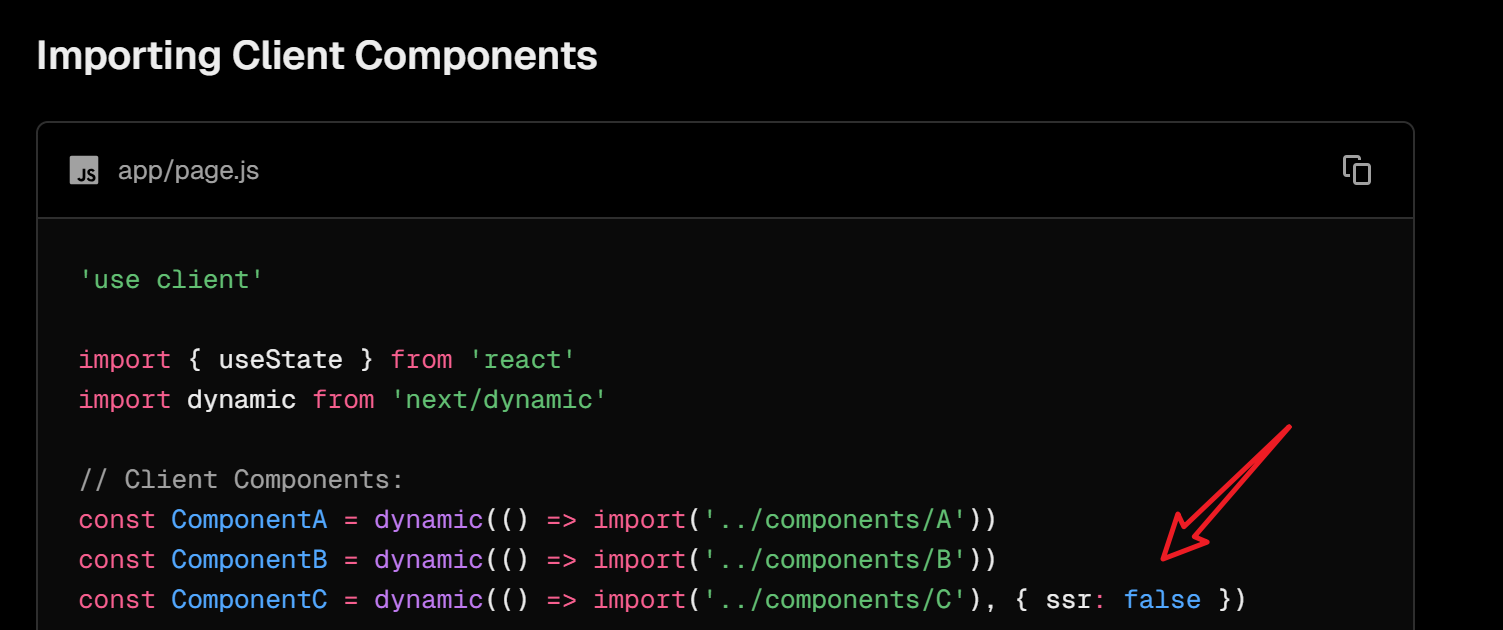
dynamicwithssr: false: If a specific component relies heavily on browser APIs (like a clock or a map), I use Next.js'sdynamicimport with thessr: falseoption. This tells Next.js to skip rendering that component on the server entirely, avoiding any mismatch from the start.Which one to choose? I prefer
useEffectfor small text changes to keep the SEO benefit of the rest of the page. I usedynamicfor heavy, client-only widgets to keep the server-side bundle light.
中文逻辑拆解:
useEffect方案(最标准):- 逻辑:让服务端和客户端第一次渲染都显示“加载中”或“空串”,等挂载(Mount)完成后,再在
useEffect里更新成真正的时间。 - 优点:符合 React 生命周期,安全可靠。
- 逻辑:让服务端和客户端第一次渲染都显示“加载中”或“空串”,等挂载(Mount)完成后,再在
dynamic禁用 SSR 方案(最省事):- 逻辑:直接告诉 Next.js:“这个组件你别在服务器跑了,只在浏览器跑。”
- 优点:完全规避 Mismatch,代码更简洁。
https://nextjs.org/docs/app/guides/lazy-loading#nextdynamic
16、what causes a memory leak in a react component using useEffect
1️⃣ Keywords
useEffect- memory leak
- cleanup function
- subscription
- async task
- unmounted component
2️⃣ Core Concepts
- Effects can keep running after a component unmounts
- Missing cleanup is the main reason for memory leaks
- Async callbacks may update state after unmount
- Event listeners and timers must be removed
3️⃣ Sub-questions
- What happens if an effect has no cleanup?
- Why does updating state after unmount cause a leak?
- Which side effects commonly cause leaks?
4️⃣ Simple English Answer
A memory leak in React occurs when a component is unmounted, but some of its processes—like event listeners, timers, or subscriptions—continue to run in the background.
To prevent this, I always use the cleanup function in
useEffect. For example:
- For Event Listeners: I use
window.removeEventListenerto ensure they don't stay in memory.- For Timers: I call
clearTimeoutorclearInterval.- For API Calls: A common scenario is an async request finishing after the component is gone. To handle this, I use an AbortController to cancel the fetch request in the cleanup function.
While React no longer warns about 'setting state on unmounted components' in newer versions, it's still a best practice to clean up to avoid unexpected behavior and memory bloat.
5️⃣ Solution
Common fixes:
- Return a cleanup function in
useEffect - Clear timers with
clearTimeoutorclearInterval - Remove event listeners
- Cancel async requests or ignore results after unmount
Example:
xxxxxxxxxx91useEffect(() => {2 const id = setInterval(() => {3 console.log("running");4 }, 1000);56 return () => {7 clearInterval(id);8 };9}, []);This prevents the effect from running after the component is unmounted.
17、How can API calls cause memory leaks in react?
1️⃣ Keywords
- API calls
- memory leak
useEffect- async / promise
- component unmount
- state update
2️⃣ Core Concepts
- API requests may finish after the component unmounts
- Updating state on an unmounted component causes leaks
- React keeps references because callbacks are still alive
- Cleanup or cancellation is required
3️⃣ Sub-questions
- What happens if an API call finishes late?
- Why is
setStateafter unmount a problem? - How can we prevent this?
4️⃣ Simple English Answer
API calls can cause memory leaks when they finish after the component unmounts. If the promise resolves and calls
setState, React warns about a memory leak. This happens because the async callback is still in memory. The component is gone, but the request is still running. Without cleanup, React cannot release the resources.
To handle this, I use an AbortController to cancel the fetch request in the cleanup function.
5️⃣ Solution
Main solutions:
Cancel the request
- Use
AbortControllerforfetch
- Use
Ignore the result after unmount
- Track a
mountedflag
- Track a
Example with AbortController:
xxxxxxxxxx161useEffect(() => {2 const controller = new AbortController();34 fetch("/api/data", { signal: controller.signal })5 .then(res => res.json())6 .then(data => setData(data))7 .catch(err => {8 if (err.name !== "AbortError") {9 console.error(err);10 }11 });1213 return () => {14 controller.abort();15 };16}, []);This ensures the API call does not update state after the component is unmounted.
18、How do event listeners create memory leaks in react?
1️⃣ Keywords
- event listeners
- memory leak
useEffect- cleanup function
addEventListenerremoveEventListener
2️⃣ Core Concepts
- Event listeners keep references to functions and components
- If not removed, they stay active after unmount
- This prevents garbage collection
- Multiple renders can add duplicate listeners
3️⃣ Sub-questions
- What happens if listeners are not removed?
- Why do they block garbage collection?
- How do re-renders make it worse?
4️⃣ Simple English Answer
Event listeners can cause memory leaks when they are added but never removed. The listener still exists after the component unmounts. It keeps a reference to the component’s callback. Because of this, the component cannot be garbage collected. Re-renders may also add the same listener multiple times.
I use
window.removeEventListenerto ensure they don't stay in memory.
5️⃣ Solution
Fix: always clean up listeners
xxxxxxxxxx111useEffect(() => {2 function handleResize() {3 console.log(window.innerWidth);4 }56 window.addEventListener("resize", handleResize);78 return () => {9 window.removeEventListener("resize", handleResize);10 };11}, []);Best practices:
- Add listeners in
useEffect - Remove them in the cleanup function
- Keep the handler reference stable (avoid inline functions)
This prevents memory leaks caused by event listeners.
19、Can setInterval or setTimeout cause memory leaks in react?
1️⃣ Keywords
setIntervalsetTimeout- memory leak
useEffect- cleanup function
- component unmount
2️⃣ Core Concepts
- Timers keep running after the component unmounts
- Callbacks keep references to component state
setIntervalis more dangerous thansetTimeout- Missing cleanup prevents garbage collection
3️⃣ Sub-questions
- What happens if a timer is not cleared?
- Why does the callback cause a leak?
- How do we clean it up correctly?
4️⃣ Simple English Answer
Yes,
setIntervalandsetTimeoutcan cause memory leaks in React. If they are not cleared, they keep running after the component unmounts. The timer callback keeps references to the component’s state and props. This prevents the component from being garbage collected.setIntervalis worse because it runs repeatedly.
I use
clearTimeoutorclearIntervalto clear timers in cleanup function.
5️⃣ Solution
Always clear timers in cleanup
x
1useEffect(() => {2 const id = setInterval(() => {3 console.log("running");4 }, 1000);56 return () => {7 clearInterval(id);8 };9}, []);Best practices:
- Use
clearIntervalforsetInterval - Use
clearTimeoutforsetTimeout - Avoid timers if they are not needed
This prevents memory leaks caused by timers.
20、Can closures or refs cause memory leaks in react?
1️⃣ Keywords
- closure
useRef- memory leak
- stale reference
- garbage collection
- long-lived references
2️⃣ Core Concepts
- Closures can keep old state and props in memory
useRefholds mutable values that survive re-renders- Long-lived references prevent garbage collection
- Leaks happen when references are never released
3️⃣ Sub-questions
- How do closures keep memory?
- Why can refs live too long?
- When do they become a problem?
4️⃣ Simple English Answer
Beyond just timers and listeners, closures and refs can also lead to memory leaks if not managed carefully.
For Closures: The issue usually stems from 'stale closures' inside a
useEffector an event handler. If a long-running function captures large objects or props but is never cleaned up, those variables cannot be garbage collected. This is especially common when a closure is passed to a global object or an external library that outlives the component. (闭包问题通常源于“陈旧闭包”。如果一个长时间运行的函数捕获了大对象或 Props 却未被清理,这些变量就无法被垃圾回收。这在闭包被传给全局对象或生命周期比组件更长的外部库时非常常见。)For Refs:
useRefis often used to store mutable values that don't trigger re-renders, but since theref.currentpersists for the entire component lifetime, it can hold onto large DOM nodes or heavy class instances indefinitely. If I manually attach a DOM element to a ref, I must ensure that I nullifyref.currentduring cleanup if that reference is being shared or stored externally. (useRef存储的变量在组件整个生命周期内都存在。如果ref.current持有了巨大的 DOM 节点或实例,内存就会持续占用。如果我手动将 DOM 挂载到 ref,我会确保在清理函数中将ref.current置为 null。)To prevent these, I rely on strict cleanup logic and tools like the Chrome Memory Profiler to take heap snapshots and identify detached nodes or retained objects. (为了防止这些问题,我依赖严格的清理逻辑,并使用 Chrome 内存分析器通过堆快照来定位脱离的 DOM 节点或被保留的对象。)
面试得分点:
引入 "Stale Closures"(陈旧闭包):这是 React 开发中的高频痛点,提到它说明你对 Hooks 的底层机制(闭包)有深入理解。
区分了“内部存储”与“外部共享”:强调了闭包传给“外部库”或“全局对象”时的风险,这才是真正的泄露大坑。
提到 "Nullifying Refs":手动将 ref.current = null 是一个很资深的习惯,尤其是在处理第三方库插件(如图表库、地图库)时。
提到了工具:提到 "Chrome Memory Profiler" 和 "Heap Snapshots" 证明你具备实战排查能力,而不仅仅是纸上谈兵。
5️⃣ Solution
Closures:
- Avoid long-lived callbacks with stale state
- Use proper dependency arrays
- Prefer functional updates when needed
xxxxxxxxxx71useEffect(() => {2 const id = setInterval(() => {3 setCount(c => c + 1);4 }, 1000);56 return () => clearInterval(id);7}, []);Refs:
- Do not store large data in refs unless needed
- Manually clean refs on unmount
x
1useEffect(() => {2 return () => {3 myRef.current = null;4 };5}, []);Rule of thumb: If something lives longer than the component, it can cause a memory leak.